Using UNION to Append Result Sets
UNION is a SQL operator that appends rows from one result set to another. Union is often used to retrieve
data from partitioned tables. For example, you have two tables where table sales06 stores 2006 sales data
and table sales07 stores 2007 sales data. If you need to have one result set that holds both 2006 and 2007
sales data, you can use union to do it.
Here is a standard format of UINON query:
select_statement_1
UNION [ALL]
select_statement_2
UNION [ALL]
select_statement_3
...
...
Here are some rules that govern the way UNION operator is used in a query.
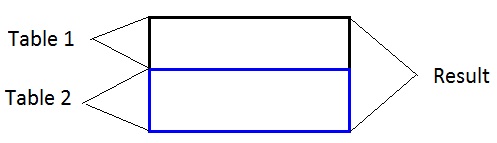
UNION ALL vertically appends Table 1 and Table 2.
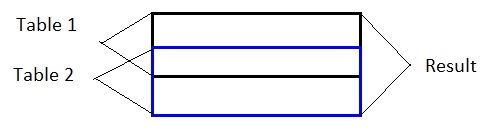
UNION vertically appends Table 1 and Table 2 but removes duplicate records where values in each corresponding column in the results from the query are the same. It's
equivalent to using UNION ALL first, then select distinct values of all columns.
In a UNION query, there are at least two SELECT statements.
The two SELECT statements must have the same number of columns and the the columns must have compatible data types. See Practice #1.
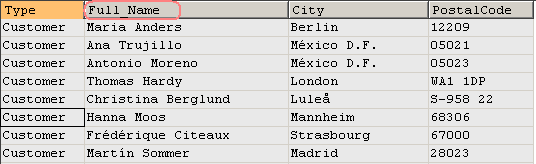
The column headings in each of the SELECT statements do not have to have the same name. The column headings in the result of a UNION query
are always taken from the first SELECT statement. See Practice #2.
If you want to sort the result set of the UNION operation, you can only put an ORDER BY clause after the last
SELECT statement. ORDER BY clause can't be specified in any other SELECT statements in the UNION query. See Practice #3.
The column(s) used in ORDER BY clause can only be taken from the first SELECT statement. See Practice #3.
If you don't specify an ORDER BY clause in the UNION query, the result set is always sorted by the first column. See Practice #1.
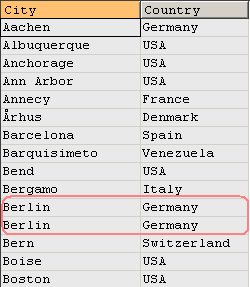
If you use UNION ALL, the entire result set from the second SELECT statement is appended to the first SELECT statement. In this case, there could be duplicate records in the unioned result set. See Practice #4.
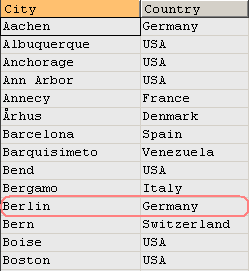
If you only use UNION, MySQL removes duplicate rows from the final result set. See Practice #5.
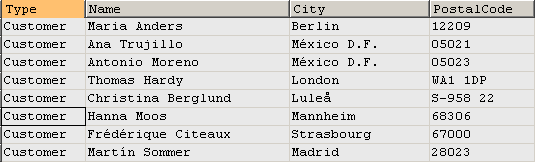
Practice #1: Using UNION All.
Most of the queries in the tutorials need Northwind MySQL database, you can download the database script on this page.
select 'Customer' as Type,
ContactName as Name,
City,
PostalCode
from customers
union all
select 'Employee' as Type,
concat(FirstName, ' ', LastName) as Name,
City, PostalCode
from employees;
Query result set - 100 rows returned:
Practice #2: Using UNION All with different column name.
Most of the queries in the tutorials need Northwind MySQL database, you can download the database script on this page.
select 'Customer' as Type,
ContactName as Full_Name,
City,
PostalCode
from customers
union all
select 'Employee' as Type,
concat(FirstName, ' ', LastName) as Name,
City, PostalCode
from employees;
Query result set - 100 rows returned:
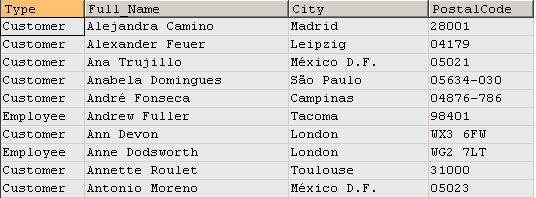
Practice #3: Using UNION All with sorted result.
Most of the queries in the tutorials need Northwind MySQL database, you can download the database script on this page.
select 'Customer' as Type,
ContactName as Full_Name,
City,
PostalCode
from customers
union all
select 'Employee' as Type,
concat(FirstName, ' ', LastName) as Name,
City, PostalCode
from employees
order by Full_Name;
Query result set - 100 rows returned:
Practice #4: Using UNION All with duplicate rows in the result.
Most of the queries in the tutorials need Northwind MySQL database, you can download the database script on this page.
select City, Country from customers
union all
select City, Country from suppliers
order by City;
Query result set - 120 rows returned:
Practice #5: Using UNION to return unique rows in the result.
Most of the queries in the tutorials need Northwind MySQL database, you can download the database script on this page.
select City, Country from customers
union
select City, Country from suppliers
order by City;
Query result set - 93 unique rows returned:
Practice #6: Using UNION for three tables.
Most of the queries in the tutorials need Northwind MySQL database, you can download the database script on this page.
select City, Country from customers
union
select City, Country from suppliers
union
select City, Country from employees
order by City;
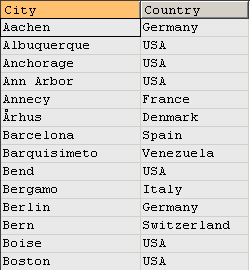
Query result set - 95 unique rows returned:
Happy Coding!
Other tutorials in this category
1. Using Inner Joins to Combine Data from Two Tables
2. Using Outer Joins to Combine Data from Two Tables
3. Another Example for Outer Joins (three tables)
4. Using Self Joins to Combine Data from the Same Table
5. SQL Set Operators - a Visual Guide to UNION, UNION ALL, MIMUS/EXCEPT, INTERSECT
6. Create working tables to demonstrate how to mimic set operators MINUS, EXCEPT, INTERSECT in MySQL
7. How to do MINUS/EXCEPT and INTERSECT in MySQL
8. How to Simulate Full Join in MySQL - Part 1: return both matched and unmatched rows
9. How to Simulate Full Join in MySQL - Part 2: return unmatched rows only
10. How to Simulate Full Join in MySQL - Part 3: use UNION to simulate FULL JOIN
11. Use Cross Join to Combine Data in MySQL
12. Differences Between Join and Union
Back to Tutorial Index Page


