Using MySQL Date and Time Functions, Part 1
MySQL Date and Time Functions are used to obtain or manipulate
Date and Time data type values .
Table below shows the default format of the zero value for date and time data.
| Data Type |
Format |
Supported Range |
Example |
| DATETIME |
'YYYY-MM-DD HH:MM:SS' |
'1000-01-01 00:00:00' to '9999-12-31 23:59:59' |
'2008-05-23 03:08:12' |
| DATE |
'YYYY-MM-DD' |
'1000-01-01' to '9999-12-31' |
'2008-05-23' |
| TIME |
'HH:MM:SS' |
'-838:59:59' to '838:59:59' |
'14:25:30' |
| TIMESTAMP |
A TIMESTAMP value is returned as a string in the format 'YYYY-MM-DD HH:MM:SS' with a display width fixed at 19 characters. To obtain the value as a number, you should add +0 to the timestamp column. |
The range is '1970-01-01 00:00:01' UTC to partway through the year 2038. TIMESTAMP values are stored as the number of seconds since the epoch ('1970-01-01 00:00:00' UTC). A TIMESTAMP cannot represent the value '1970-01-01 00:00:00' because that is equivalent to 0 seconds from the epoch and the value 0 is reserved for representing '0000-00-00 00:00:00', the "zero" TIMESTAMP value. |
'2008-05-23 03:08:12' |
| YEAR |
YYYY (default format)
or YY |
In four-digit format, the allowable values are 1901 to 2155, and 0000.
In two-digit format, the allowable values are 70 to 69, representing years from 1970 to 2069.
|
2008 |
Here are the links to Part 2 and 3:
- Part 2 of MySQL Date and Time Functions
- Part 3 of MySQL Date and Time Functions
Here is the list of MySQL Date and Time Functions for Part 1:
| No. |
Name |
Description |
| 1 | ADDDATE() | This function performs date arithmetic. There are two forms of using ADDDATE:
1. ADDDATE(expr,days)
In this form, expr is an integer number of days to be added to expr. See Practice #1.
2. ADDDATE(date,INTERVAL expr unit)
In this form, ADDDATE() is a synonym for DATE_ADD. |
| 2 | ADDTIME(expr1,expr2) | ADDTIME adds expr2 to expr1 and returns the result. expr1 is a time or datetime expression,
and expr2 is a time expression.
See Practice #2 where expr1 is a time expression.
See Practice #3 where expr1 is a datetime expression. |
| 3 | CONVERT_TZ(dt,from_tz,to_tz) | CONVERT_TZ converts a datetime value dt from the time zone given by from_tz to the time zone
given by to_tz and returns the resulting value.
Time zone values in from_tz and to_tz can be given in several formats, none of which are case sensitive:
The value can be given as a named time zone, such as 'Europe/Helsinki', 'US/Eastern', or 'MET'. Named time zones can be used only if the time zone information tables in the mysql database have been created and populated. See Practice #3-1.
To use named time zones such as 'MET' or 'Europe/Moscow', the time zone tables must be properly set up in the system database mysql.
Refer to article How to load time zone data for MySQL on Windows for more information.
The value can be given as a string indicating an offset from UTC, such as '+10:00' or '-6:00'. See Practice #3-2. The value 'SYSTEM' indicates that the time zone should be the same as the system time zone.
If the value falls out of the supported range of the TIMESTAMP type when converted from from_tz to UTC,
no conversion occurs. See Practice #3-3.
For detailed information about timestamp, read this article How to use Date and Time data as integer value in PHP and MySQL.
|
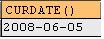
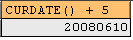
| 4 | CURDATE() | Returns the current date as a value in 'YYYY-MM-DD' format (See Practice #4-1)
or YYYYMMDD format (See Practice #4-2), depending on whether the function is used in a string or numeric context.
|
| 5 | CURRENT_DATE
CURRENT_DATE() | Synonyms for CURDATE()
|
| 6 | CURRENT_TIME
CURRENT_TIME() | Synonyms for CURTIME() |
| 7 | CURRENT_TIMESTAMP
CURRENT_TIMESTAMP() | Synonyms for NOW() |
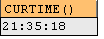
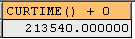
| 8 | CURTIME() | Returns the current time as a value in 'HH:MM:SS' format (See Practice #8-1)
or HHMMSS.uuuuuu format (See Practice #8-2), depending on whether the function is used in a string or numeric context.
The value is expressed in the current time zone.
|
| 9 | DATE_ADD(
date,INTERVAL expr unit) | DATE_ADD performs date arithmetic by adding two dates.
The date argument specifies the starting date or datetime value.
expr is an expression specifying the interval value to be added
to the starting date. expr is a string; it may start with a "-" for
negative intervals. unit is a keyword indicating the units in which the expr should be interpreted.
The INTERVAL keyword and the unit specifier are not case sensitive.
| unit Value |
expr Format |
| MICROSECOND |
MICROSECONDS
Example: INTERVAL 1 MICROSECOND
Meaning: 1 microsecond
Practice #9-1
|
| SECOND |
SECONDS
Example: INTERVAL 1 SECOND
Meaning: 1 second
Practice #9-2
|
| MINUTE |
MINUTES
Example: INTERVAL 12 MINUTE
Meaning: 12 minutes
Practice #9-3
|
| HOUR |
HOURS
Example: INTERVAL 3 HOUR
Meaning: 3 hours
Practice #9-4
|
| DAY |
DAYS
Example: INTERVAL 5 DAY
Meaning: 5 days
Practice #9-5
|
| WEEK |
WEEKS
Example: INTERVAL 5 WEEK
Meaning: 5 weeks
Practice #9-6
|
| MONTH |
MONTHS
Example: INTERVAL 5 MONTH
Meaning: 5 months
Practice #9-7
|
| QUARTER |
QUARTERS
Example: INTERVAL 2 QUARTER
Meaning: 2 quarters
Practice #9-8
|
| YEAR |
YEARS
Example: INTERVAL 3 YEAR
Meaning: 3 years
Practice #9-9
|
| SECOND_MICROSECOND |
'SECONDS.MICROSECONDS'
Example: INTERVAL '1.000123' SECOND_MICROSECOND
Meaning: 1 second and 123 microseconds
Practice #9-10
|
| MINUTE_MICROSECOND |
'MINUTES.SECONDS.MICROSECONDS'
Example: INTERVAL '1.1.000123' MINUTE_MICROSECOND
Meaning: 1 minute, 1 second, and 123 microseconds
Practice #9-11
|
| MINUTE_SECOND |
'MINUTES:SECONDS'
Example: INTERVAL '1:15' MINUTE_SECOND
Meaning: 1 minute and 15 seconds
Practice #9-12
|
| HOUR_MICROSECOND |
'HOURS.MINUTES.SECONDS.MICROSECONDS'
Example: INTERVAL '1.1.1.000123' HOUR_MICROSECOND
Meaning: 1 hour, 1 minute, 1 second, and 123 microseconds
Practice #9-13
|
| HOUR_SECOND |
'HOURS:MINUTES:SECONDS'
Example: INTERVAL '5:21:58' HOUR_SECOND
Meaning: 5 hours, 21 minutes, and 58 seconds
Practice #9-14
|
| HOUR_MINUTE |
'HOURS:MINUTES'
Example: INTERVAL '5:21' HOUR_MINUTE
Meaning: 5 hours and 21 minutes
Practice #9-15
|
| DAY_MICROSECOND |
'DAYS.HOURS.MINUTES.SECONDS.MICROSECONDS'
Example: INTERVAL '1.1.1.1.000123' DAY_MICROSECOND
Meaning: 1 day, 1 hour, 1 minute, 1 second, and 123 microseconds
Practice #9-16
|
| DAY_SECOND |
'DAYS HOURS:MINUTES:SECONDS'
Example: INTERVAL '1 2:05:27' DAY_SECOND
Meaning: 1 day, 2 hours, 5 minutes, and 27 seconds
Practice #9-17
|
| DAY_MINUTE |
'DAYS HOURS:MINUTES'
Example: INTERVAL '1 2:05' DAY_MINUTE
Meaning: 1 day, 2 hours, and 5 minutes
Practice #9-18
|
| DAY_HOUR |
'DAYS HOURS'
Example: INTERVAL '1 2' DAY_HOUR
Meaning: 1 day and 2 hours
Practice #9-19
|
| YEAR_MONTH |
'YEARS MONTHS'
Example: INTERVAL '1 5' YEAR_MONTH
Meaning: 1 year and 5 months
Practice #9-20
|
If you specify an interval value that is too short (does not
include all the interval parts that would be expected from the unit
keyword), MySQL assumes that you have left out the leftmost parts of
the interval value. See Practice #9-21.
Date arithmetic also can be performed using INTERVAL
together with the + or - operator:
date + INTERVAL expr unit
date - INTERVAL expr unit
INTERVAL expr unit is allowed on either
side of the + operator if the expression on the other
side is a date or datetime value. See Practice #9-22.
For the - operator,
INTERVAL expr unit is allowed only on the right side, because it makes no sense to subtract a date or datetime value from an interval.
See Practice #9-23 |
Practice #1: Using ADDDATE function.
Most of the queries in the tutorials need Northwind MySQL database, you can download the database script on this page.
SELECT ADDDATE('2008-05-22', 31);
Query result set - 1 row returned:

Practice #2: Using ADDTIME function where expr1 is time expression
Most of the queries in the tutorials need Northwind MySQL database, you can download the database script on this page.
SELECT ADDTIME('16:00:00.567', '02:00:00.123');
Query result set - 1 row returned:

Practice #3: Using ADDTIME function where expr1 is datetime expression
Most of the queries in the tutorials need Northwind MySQL database, you can download the database script on this page.
SELECT ADDTIME('2008-05-22 23:59:59.999999', '1:1:1.000002');
Query result set - 1 row returned:

Practice #3-1: Using CONVERT_TZ function with named time zone
Most of the queries in the tutorials need Northwind MySQL database, you can download the database script on this page.
SELECT CONVERT_TZ('2004-01-01 12:00:00','GMT','Europe/Moscow');
To use named time zones such as 'MET' or 'Europe/Moscow', the time zone tables must be properly set up in the system database mysql.
Refer to article How to load time zone data for MySQL on Windows for more information.
Query result set - 1 row returned:

Practice #3-2: Using CONVERT_TZ function with values of offset from UTC
Most of the queries in the tutorials need Northwind MySQL database, you can download the database script on this page.
SELECT CONVERT_TZ('2005-06-06 2:00:00','+7:00','+8:00');
Query result set - 1 row returned:

Practice #3-3: Using CONVERT_TZ function with values falling out of supported range for UTC timestamp
Most of the queries in the tutorials need Northwind MySQL database, you can download the database script on this page.
SELECT CONVERT_TZ('1969-02-23 12:00:00','GMT','Europe/Moscow');
Query result set - 1 row returned:

For detailed information about timestamp, read this article How to use Date and Time data as integer value in PHP and MySQL.
Practice #4-1: Using CURDATE function and return current date in YYYY-MM-DD format
Most of the queries in the tutorials need Northwind MySQL database, you can download the database script on this page.
Query result set - 1 row returned:
Practice #4-2: Using CURDATE function and return date in YYYYMMDD format
Most of the queries in the tutorials need Northwind MySQL database, you can download the database script on this page.
Query result set - 1 row returned:
Practice #8-1: Using CURTIME function and return current time in HH:MM:SS format
Most of the queries in the tutorials need Northwind MySQL database, you can download the database script on this page.
Query result set - 1 row returned:
Practice #8-2: Using CURTIME function and return current time in HHMMSS.uuuuuu format
Most of the queries in the tutorials need Northwind MySQL database, you can download the database script on this page.
Query result set - 1 row returned:
Practice #9-1: Using DATE_ADD function for MICROSECOND interval
Most of the queries in the tutorials need Northwind MySQL database, you can download the database script on this page.
SELECT DATE_ADD('1992-12-31 23:59:59.000002',
INTERVAL 1 MICROSECOND) AS new_date;
Query result set - 1 row returned:

Practice #9-2: Using DATE_ADD function for SECOND interval
Most of the queries in the tutorials need Northwind MySQL database, you can download the database script on this page.
SELECT DATE_ADD('1992-12-31 23:59:59.000002',
INTERVAL 1 SECOND) AS new_date;
Query result set - 1 row returned:

Practice #9-3: Using DATE_ADD function for MINUTE interval
Most of the queries in the tutorials need Northwind MySQL database, you can download the database script on this page.
SELECT DATE_ADD('1992-12-31 23:59:59.000002',
INTERVAL 12 MINUTE) AS new_date;
Query result set - 1 row returned:

Practice #9-4: Using DATE_ADD function for HOUR interval
Most of the queries in the tutorials need Northwind MySQL database, you can download the database script on this page.
SELECT DATE_ADD('1992-12-31 23:59:59.000002',
INTERVAL 3 HOUR) AS new_date;
Query result set - 1 row returned:

Practice #9-5: Using DATE_ADD function for DAY interval
Most of the queries in the tutorials need Northwind MySQL database, you can download the database script on this page.
SELECT DATE_ADD('1992-12-31 23:59:59.000002',
INTERVAL 5 DAY) AS new_date;
Query result set - 1 row returned:

Practice #9-6: Using DATE_ADD function for WEEK interval
Most of the queries in the tutorials need Northwind MySQL database, you can download the database script on this page.
SELECT DATE_ADD('1992-12-31 23:59:59.000002',
INTERVAL 5 WEEK) AS new_date;
Query result set - 1 row returned:

Practice #9-7: Using DATE_ADD function for MONTH interval
Most of the queries in the tutorials need Northwind MySQL database, you can download the database script on this page.
SELECT DATE_ADD('1992-12-31 23:59:59.000002',
INTERVAL 5 MONTH) AS new_date;
Query result set - 1 row returned:

Practice #9-8: Using DATE_ADD function for QUARTER interval
Most of the queries in the tutorials need Northwind MySQL database, you can download the database script on this page.
SELECT DATE_ADD('1992-12-31 23:59:59.000002',
INTERVAL 2 QUARTER) AS new_date;
Query result set - 1 row returned:

Practice #9-9: Using DATE_ADD function for YEAR interval
Most of the queries in the tutorials need Northwind MySQL database, you can download the database script on this page.
SELECT DATE_ADD('1992-12-31 23:59:59.000002',
INTERVAL 3 YEAR) AS new_date;
Query result set - 1 row returned:

Practice #9-10: Using DATE_ADD function for SECOND_MICROSECOND interval
Most of the queries in the tutorials need Northwind MySQL database, you can download the database script on this page.
SELECT DATE_ADD('1992-12-31 23:59:59.000002',
INTERVAL '1.000123' SECOND_MICROSECOND) AS new_date;
Query result set - 1 row returned:

Practice #9-11: Using DATE_ADD function for MINUTE_MICROSECOND interval
Most of the queries in the tutorials need Northwind MySQL database, you can download the database script on this page.
SELECT DATE_ADD('1992-12-31 23:59:59.000002',
INTERVAL '1.1.000123' MINUTE_MICROSECOND) AS new_date;
Query result set - 1 row returned:

Practice #9-12: Using DATE_ADD function for MINUTE_SECOND interval
Most of the queries in the tutorials need Northwind MySQL database, you can download the database script on this page.
SELECT DATE_ADD('1992-12-31 23:59:59.000002',
INTERVAL '1:15' MINUTE_SECOND) AS new_date;
Query result set - 1 row returned:

Practice #9-13: Using DATE_ADD function for HOUR_MICROSECOND interval
Most of the queries in the tutorials need Northwind MySQL database, you can download the database script on this page.
SELECT DATE_ADD('1992-12-31 23:59:59.000002',
INTERVAL '1.1.1.000123' HOUR_MICROSECOND) AS new_date;
Query result set - 1 row returned:

Practice #9-14: Using DATE_ADD function for HOUR_SECOND interval
Most of the queries in the tutorials need Northwind MySQL database, you can download the database script on this page.
SELECT DATE_ADD('1992-12-31 23:59:59.000002',
INTERVAL '5:21:58' HOUR_SECOND) AS new_date;
Query result set - 1 row returned:

Practice #9-15: Using DATE_ADD function for HOUR_MINUTE interval
Most of the queries in the tutorials need Northwind MySQL database, you can download the database script on this page.
SELECT DATE_ADD('1992-12-31 23:59:59.000002',
INTERVAL '5:21' HOUR_MINUTE) AS new_date;
Query result set - 1 row returned:

Practice #9-16: Using DATE_ADD function for DAY_MICROSECOND interval
Most of the queries in the tutorials need Northwind MySQL database, you can download the database script on this page.
SELECT DATE_ADD('1992-12-31 23:59:59.000002',
INTERVAL '1.1.1.1.000123' DAY_MICROSECOND) AS new_date;
Query result set - 1 row returned:

Practice #9-17: Using DATE_ADD function for DAY_SECOND interval
Most of the queries in the tutorials need Northwind MySQL database, you can download the database script on this page.
SELECT DATE_ADD('1992-12-31 23:59:59.000002',
INTERVAL '1 2:05:27' DAY_SECOND) AS new_date;
Query result set - 1 row returned:

Practice #9-18: Using DATE_ADD function for DAY_MINUTE interval
Most of the queries in the tutorials need Northwind MySQL database, you can download the database script on this page.
SELECT DATE_ADD('1992-12-31 23:59:59.000002',
INTERVAL '1 2:05' DAY_MINUTE) AS new_date;
Query result set - 1 row returned:

Practice #9-19: Using DATE_ADD function for DAY_HOUR interval
Most of the queries in the tutorials need Northwind MySQL database, you can download the database script on this page.
SELECT DATE_ADD('1992-12-31 23:59:59.000002',
INTERVAL '1 2' DAY_HOUR) AS new_date;
Query result set - 1 row returned:

Practice #9-20: Using DATE_ADD function for YEAR_MONTH interval
Most of the queries in the tutorials need Northwind MySQL database, you can download the database script on this page.
SELECT DATE_ADD('1992-12-31 23:59:59.000002',
INTERVAL '1 5' YEAR_MONTH) AS new_date;
Query result set - 1 row returned:

Practice #9-21: Using DATE_ADD function where it does not include all the interval parts
Most of the queries in the tutorials need Northwind MySQL database, you can download the database script on this page.
SELECT DATE_ADD('1992-12-31 23:59:59.000002',
INTERVAL '1.000123' SECOND_MICROSECOND) AS new_date;
SELECT DATE_ADD('1992-12-31 23:59:59.000002',
INTERVAL '1.000123' MINUTE_MICROSECOND) AS new_date;
SELECT DATE_ADD('1992-12-31 23:59:59.000002',
INTERVAL '1.000123' HOUR_MICROSECOND) AS new_date;
SELECT DATE_ADD('1992-12-31 23:59:59.000002',
INTERVAL '1.000123' DAY_MICROSECOND) AS new_date;
All four queries return the same result set - 1 row returned:

Practice #9-22: Using + operator to add date
Most of the queries in the tutorials need Northwind MySQL database, you can download the database script on this page.
SELECT '1992-12-31 23:59:59.000002'
+ INTERVAL 1 SECOND AS new_result;
Query result set - 1 row returned:

Practice #9-23: Using - operator to add date
Most of the queries in the tutorials need Northwind MySQL database, you can download the database script on this page.
SELECT '1992-12-31 23:59:59.000002'
- INTERVAL 1 SECOND AS new_result;
Query result set - 1 row returned:

Other tutorials in this category
1. Using String Functions, Part 1
2. Using String Functions, Part 2
3. Using String Functions, Part 3
4. Using MySQL Date and Time Functions, Part 2
5. Using MySQL Date and Time Functions, Part 3
6. Using MySQL Control Flow Functions
7. Using MySQL Conversion Functions
8. Using MySQL Comparison Functions
9. Using Aggregate Functions in MySQL
10. MySQL RANK() function
11. MySQL DENSE_RANK() function
12. MySQL ROW_NUMBER() function
13. Compare RANK(), DENSE_RANK(), and ROW_NUMBER() function
14. Using LIMIT and OFFSET to Page Thru Query Result in MySQL
15. Using LIMIT, SQL_CALC_FOUND_ROWS and FOUND_ROWS() to Page Thru Query Result in MySQL
16. Use LEAST function to find the SMALLEST value from multiple arguments
17. How to make case-sensitive comparison in MySQL
18. Use GREATEST function to find the LARGEST value from multiple arguments
19. MySQL MID() function with examples
20. MySQL LOCATE() function with examples
21. MySQL SUBSTR() function with examples
22. MySQL POSITION() function with examples
23. How to use MySQL REPLACE function in SELECT and UPDATE queries
Back to Tutorial Index Page


