|
|
|
|

Custom Search
| |
|
| |
|
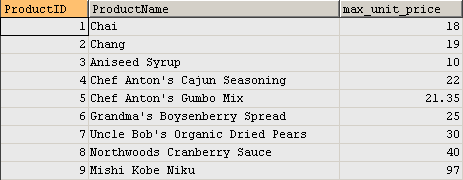
Using subquery in FROM clause in MySQL When you put a select statement into a FROM clause, it becomes a subquery. The subquery returns a temporary table in database server's memory and then it is used by the outer query for further processing. Please note that, using subquery in FROM clause should generally be avoided if you can rewrite your query in a different way, the reason being that no indexes can be used on a temporary table in memory. Also, A subquery in the FROM clause can't be correlated subquery as it can't be evaluated per row of the outer query. Practice #1: Use subquery in FROM clause. Most of the queries in the tutorials need Northwind MySQL database, you can download the database script on this page. /*
Query result set - 77 rows returned: Other tutorials in this category 1. What is subquery |
|
Copyright © 2024 GeeksEngine.com. All Rights Reserved. This website is hosted by HostGator. No portion may be reproduced without my written permission. Software and hardware names mentioned on this site are registered trademarks of their respective companies. Should any right be infringed, it is totally unintentional. Drop me an email and I will promptly and gladly rectify it. |
| Home | Feedback | Terms of Use | Privacy Policy |