Custom Search


Using Logical Operators


Logical operators enable us to use more than one condition in WHERE clause.

Read Prerequisites for this tutorial and practices if you haven't done so.

List of logical operators in MySQL:

Operator Meaning
NOT Negate a condition to its opposite.

NOT TRUE => FALSE

NOT FALSE => TRUE

NOT UNKNOWN => UNKNOWN

AND Returns TRUE if both conditions are TRUE.
&& The same as AND operator. Returns TRUE if both conditions are TRUE.
OR Returns TRUE if either condition is TRUE.
|| The same as OR operator. Returns TRUE if either condition is TRUE.
XOR Equivalent to AND NOT. See Practice #7.

Consider the following facts when using logical operators in a SELECT statement:

  1. In MySQL, the result of logical operations is evaluated as 1 (TRUE), 0 (FALSE), or NULL.

  2. MySQL evaluates any non-zero or non-NULL value to TRUE.

  3. Order of Precedence for logical operators is shown below. Arithmetic operators and comparison operators take higher precedence than logical operators.

    Order Evaluated Operator
    1 Arithmetic operators
    2 Comparison operators
    3 NOT
    4 &&, AND
    5 XOR
    6 ||, OR
  4. NOT operator can be used with a comparison operator to negate the result of the comparison.

    NOT BETWEEN...AND...

    NOT IN (value1, value2, value3,...)

    NOT LIKE

    IS NOT NULL

Practice #1: Using AND operator.

In Firefox (not IE), copy and paste the following SQL to your SQLyog query window. Note that the SQL needs to end with semi-colon if you have multiple queries in the query window. Most of the queries in the tutorials need Northwind MySQL database, you can download the database script on this page.

/*
Find products in Beverages category and their
number of units in stock is less than reorder level.
Query 1 and 2 return the same result.
*/

-- Query 1: use AND operator
SELECT ProductID, ProductName
FROM products
WHERE UnitsInStock < ReorderLevel
AND CategoryID=1;

-- Query 2: use && operator
SELECT ProductID, ProductName
FROM products
WHERE UnitsInStock < ReorderLevel
&&
CategoryID=1;

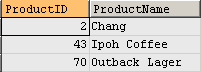
AND (&&) operator requires both conditions to be TRUE.

Query result set - 3 rows returned:
Use AND logical operator

AND Truth Table

The following table shows the result of comparing two expressions with AND operator:

TRUE FALSE UNKNOWN
TRUE TRUE FALSE UNKNOWN
FALSE FALSE FALSE FALSE
UNKNOWN UNKNOWN FALSE UNKNOWN

Practice #2: Using OR operator

In Firefox (not IE), copy and paste the following SQL to your SQLyog query window. Note that the SQL needs to end with semi-colon if you have multiple queries in the query window. Most of the queries in the tutorials need Northwind MySQL database, you can download the database script on this page.

/*
Find products in Beverages or Seafood category.
Query 1 and 2 return the same result.
*/

-- Query 1: use OR operator
SELECT ProductID, ProductName
FROM products
WHERE CategoryID=1 OR CategoryID=8;

-- Query 2: use || operator
SELECT ProductID, ProductName
FROM products
WHERE CategoryID=1 || CategoryID=8;

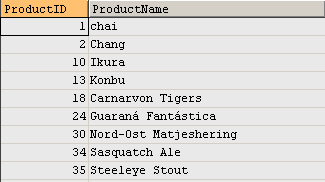
OR (||) operator requires either condition to be TRUE.

Query result set - 24 rows returned:
Use OR logical operator

OR Truth Table

The following table shows the result of comparing two expressions with OR operator:

TRUE FALSE UNKNOWN
TRUE TRUE TRUE TRUE
FALSE TRUE FALSE UNKNOWN
UNKNOWN TRUE UNKNOWN UNKNOWN

Practice #3: Use NOT BETWEEN...AND...

In Firefox (not IE), copy and paste the following SQL to your SQLyog query window. Note that the SQL needs to end with semi-colon if you have multiple queries in the query window. Most of the queries in the tutorials need Northwind MySQL database, you can download the database script on this page.

-- List products which unit price is not
-- between 0 and 100, inclusive.
SELECT ProductID, ProductName, UnitPrice
FROM products
WHERE UnitPrice NOT BETWEEN 0 AND 100;

Query result set - 2 rows returned:
Result of using NOT BETWEEN...AND...

Practice #4: Use NOT IN (value1, value2, value3, ...)

In Firefox (not IE), copy and paste the following SQL to your SQLyog query window. Note that the SQL needs to end with semi-colon if you have multiple queries in the query window. Most of the queries in the tutorials need Northwind MySQL database, you can download the database script on this page.

-- List products which reorder level is not 
-- in the list of 0, 10, 15, 20, 25, and 30.
SELECT ProductID, ProductName, ReorderLevel
FROM products
WHERE ReorderLevel NOT IN (0,10,15,20,25,30);

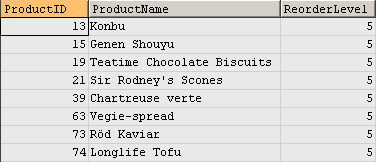
Query result set - 8 rows returned:
Result of using Use NOT IN

Practice #5: Use NOT LIKE

In Firefox (not IE), copy and paste the following SQL to your SQLyog query window. Note that the SQL needs to end with semi-colon if you have multiple queries in the query window. Most of the queries in the tutorials need Northwind MySQL database, you can download the database script on this page.

-- Retrieve all products which product 
-- name does not begin with C
SELECT ProductID, ProductName
FROM products
WHERE ProductName NOT LIKE 'C%';

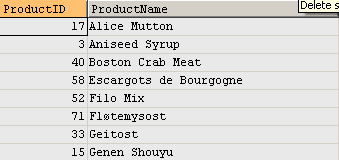
Query result set - 68 rows returned:
Result of using NOT LIKE

Practice #6: Use NOT NULL

In Firefox (not IE), copy and paste the following SQL to your SQLyog query window. Note that the SQL needs to end with semi-colon if you have multiple queries in the query window. Most of the queries in the tutorials need Northwind MySQL database, you can download the database script on this page.

-- Find all the employees who have someone  
-- to report to.
SELECT EmployeeID, FirstName, LastName
FROM employees
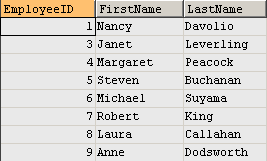
WHERE ReportsTo IS NOT NULL;

Query result set - 8 rows returned:
Result of using NOT NULL

Practice #7: Use XOR operator

In Firefox (not IE), copy and paste the following SQL to your SQLyog query window. Note that the SQL needs to end with semi-colon if you have multiple queries in the query window. Most of the queries in the tutorials need Northwind MySQL database, you can download the database script on this page.

/*
Query 1: Get all employees who report to Vice
President and the result should exclude Nancy
if it exists in FirstName column.

XOR is equivalent to AND NOT. See Query 2.
*/
SELECT EmployeeID, FirstName, LastName, ReportsTo
FROM employees
WHERE ReportsTo=2 XOR FirstName='Nancy';

-- Query 2 returns the same result as Query 1.
SELECT EmployeeID, FirstName, LastName, ReportsTo
FROM employees
WHERE ReportsTo=2 AND NOT FirstName='Nancy';

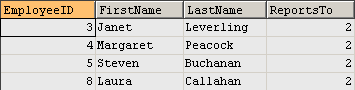
The two queries return the same result.

Query result set - 4 rows returned:
Result of using XOR


  1. Next tutorial: Eliminating Duplicate Rows

  2. Back to Section Index: Single Table SELECT Statement

  3. Back to Tutorial Index: MySQL Database How-to Articles and Tutorials


Copyright © 2012 GeeksEngine.com. All Rights Reserved.

This website is hosted by LunarPages.

No portion may be reproduced without my written permission. Software and hardware names mentioned on this site are registered trademarks of their respective companies. Should any right be infringed, it is totally unintentional. Drop me an email and I will promptly and gladly rectify it.

 
Home | Kung Fu Timer | Feedback | Terms of Use | Privacy Policy