|
|
|
|

Custom Search
| |
|
| |
|
How to use ADOX to create unique composite index - the VBA approach
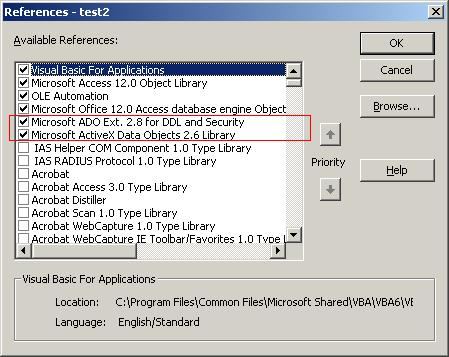
In article how to create a composite unique index (not as a primary key), we have looked at how to manually create a composite unique index in Access. Here in this article, we'll see how to use ADOX objects (by VBA coding) to create the exact same composite unique index in Access. The purpose is to give a practical view about some ADOX intrinsics, especially when manually building and modifying Access database schema is not possible or very inconvenient. Using ADOX can seamlessly achieve some complex tasks which otherwise would require the end-user to manually create or modify schema objects (tables, indexes, keys, etc.). So coding some ADOX will definitely give the end-user better experience in our MS Access applications. ADOX is Microsoft's ActiveX Data Objects (ADO) Extensions for database schema creation, modification, as well as security management. If you are not familiar with ADOX, here is Microsoft help document about "ADOX Fundamentals". To use ADOX in Access VBA, you need to add reference to two Microsoft libraries. In VBA editor, click Tools -> References...
There are two code examples showing below. The first one explains how to create the composite unique index in an existing table in Access. The second one explains how to create the table and then create the composite unique index in this new table. Example 1: Creates unique composite index in an existing table. This sub-routine creates the composite unique index in an existing table.
Private Sub cmdAdd_Click()
    On Error Goto Catch

    Dim cnn As ADODB.Connection
    Dim cat As ADOX.Catalog
    Dim idx As ADOX.Index

    '' Create the composite unique index
    Set idx = New ADOX.Index
    With idx
        .Name = "Uidx_Products"
        .IndexNulls = adIndexNullsAllow
        .PrimaryKey = False
        .Unique = True

        .Columns.Append "Product_Name"
        .Columns.Append "Category_ID"
    End With

    '' Create the connection object
    Set cnn = CurrentProject.Connection

    '' Create the catalog object.
    Set cat = New ADOX.Catalog

    '' Assign connection to catalog object.
    Set cat.ActiveConnection = cnn

    '' Use catalog object to append the new index to the existing table.
    cat.Tables("Table1").Indexes.Append idx

    '' Insert some records for testing.
    cnn.Execute "INSERT INTO Table1(Product_Name, Category_ID) values ('Chocolade', 1)"
    cnn.Execute "INSERT INTO Table1(Product_Name, Category_ID) values ('Cheese', 2)"
    cnn.Execute "INSERT INTO Table1(Product_Name, Category_ID) values ('Chocolade', 2)"

    '' Close connection and release resources.
    cnn.Close
    Set cnn = Nothing
    Set cat = Nothing
    Set idx = Nothing

    MsgBox "Composite unique index has been successfully created in Table1."

    Exit Sub

Catch:
    MsgBox "cmdAdd_Click()" & vbCrLf & vbCrLf & " Error: " & Err.Description
End Sub
Example 2: Creates unique composite index in a new table. This sub-routine creates a table and then create the composite unique index in this table.
Private Sub cmdCreate_Click()
    On Error Goto Catch

    Dim cat As ADOX.Catalog
    Dim tbl As ADOX.Table
    Dim col As New ADOX.Column
    Dim cnn As ADODB.Connection
    Dim idx As ADOX.Index

    '' Connect to current database.
    Set cnn = CurrentProject.Connection

    '' Create the catalog object.
    Set cat = New ADOX.Catalog

    '' Assign connection to catalog object.
    Set cat.ActiveConnection = cnn

    '' Create a new table call Table2.
    Set tbl = New ADOX.Table
    tbl.Name = "Table2"

    '' Add columns to this new table.
    tbl.Columns.Append "ID", adInteger
    tbl.Columns.Append "Product_Name", adVarWChar, 200
    tbl.Columns.Append "Category_ID", adInteger
    tbl.Keys.Append "PrimaryKey", adKeyPrimary, "ID"

    '' Specify the ID primary key column to be AutoNumber field.
    With tbl.Columns.Item("ID")
        Set .ParentCatalog = cat
        .Properties("Autoincrement") = True
    End With

    '' Append the table to catalog
    cat.Tables.Append tbl

    '' Create the composite unique index
    Set idx = New ADOX.Index
    idx.Name = "Uidx_Products"
    idx.IndexNulls = adIndexNullsAllow
    idx.PrimaryKey = False
    idx.Unique = True

    '' Append two columns to the index.
    idx.Columns.Append "Product_Name"
    idx.Columns.Append "Category_ID"

    '' Append the index to the table we just created.
    tbl.Indexes.Append idx

    '' Insert some records for testing.
    cnn.Execute "INSERT INTO Table2(Product_Name, Category_ID) values ('Chocolade', 1)"
    cnn.Execute "INSERT INTO Table2(Product_Name, Category_ID) values ('Cheese', 2)"
    cnn.Execute "INSERT INTO Table2(Product_Name, Category_ID) values ('Chocolade', 2)"

    '' Close connection and release resources.
    cnn.Close
    Set cnn = Nothing
    Set tbl = Nothing
    Set cat = Nothing
    Set col = Nothing
    Set idx = Nothing

    MsgBox "Table and composite unique index have been successfully created."

    Exit Sub

Catch:
    MsgBox "cmdCreate_Click()" & vbCrLf & vbCrLf & " Error: " & Err.Description
End Sub
Happy Coding!
|
|
Copyright © 2024 GeeksEngine.com. All Rights Reserved. This website is hosted by HostGator. No portion may be reproduced without my written permission. Software and hardware names mentioned on this site are registered trademarks of their respective companies. Should any right be infringed, it is totally unintentional. Drop me an email and I will promptly and gladly rectify it. |
| Home | Feedback | Terms of Use | Privacy Policy |