|
|
|
|

Custom Search
| |
|
| |
|
How to return multiple values from a VBA function (Part 3)
Part 3 - Using recordset and VBA class This is part 3 of the article series - 8 ways to return multiple values from a VBA function. In this article, we are going to look at how to return multiple values by using database recordset and VBA class. Here are the other two parts of this article series.
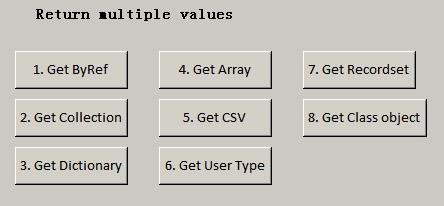
Part 1 - Return multiple values by By Reference argument, collection, and dictionary object. Code used in this article is based on a simple Access form as shown below. Each button click event triggers a function that returns multiple values and displays in Immediate Window.
A simple form with 8 buttons for testing use. 7. Return multiple values by using database recordset. Microsoft ADO recordset is the ADO Recordset object that holds a set of records from a database table. A Recordset object consists of rows and columns (like an Excel range), but the Recordset object can also hold only a single record with only one row and one column. For more information, please refer to Microsoft MSDN resources about ADO recordset here Recordset Object (ADO). Below is a SQL query that select FirstName and LastName from Employees table in Northwind database. When you need to return multiple values from a function, you may consider to store them in a database table if these data can be grouped or related together in one table or multiple tables. Please read this article series about database design.
' This function returns a recordset which can hold multiple values.
Public Function GetEmployees() As ADODB.Recordset
    Dim rst As ADODB.Recordset
    Set rst = New ADODB.Recordset

    Set GetEmployees = CurrentProject.Connection.Execute("select FirstName, LastName from Employees")
End Function
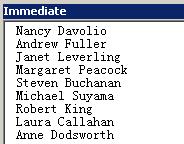
To test, we call the function from the click event cmdGetRecordset_Click() on Form1 for button [7. Get Recordset]. In this subroutine, function GetEmployees() is called and returns the recordset. Then we display the values in Immediate Window.
' Retrieve first name and last name of all records from Employees table of Northwind database.
Private Sub cmdGetRecordset_Click()
    Dim strFirstName As String
    Dim strLastName As String

    Dim rst As ADODB.Recordset
    Set rst = New ADODB.Recordset

    ' Get the recordset object.
    Set rst = GetEmployees()

    ' Use loop to iterate through the recordset row by row to read its content.
    Do While Not rst.EOF
        strFirstName = rst!FirstName
        strLastName = rst!LastName

        ' Display in Immediate window.
        Debug.Print strFirstName & " " & strLastName

        rst.MoveNext
    Loop

    rst.Close
    Set rst = Nothing
End Sub
Immediate Window shows all employee names. 8. Return multiple values by using class members. According to MSDN, a class is a fundamental building block of object-oriented programming (OOP). In essence, a class defines a new data type which is used to create a class object. This class object can then be used to return multiple values of the class member. One of the core functionalities of classes is encapsulation, which encapsulates data and methods within the class. When data is contained in a class, they can be retrieved by using a class method, which can be used to return multiple values from a class. Note that data and method within a class are hidden from the outside world and are accessible only through Public interface of the class, which are the public properties, methods and events. In simple words, the outside world can only deal with the things that are exposed by the class for the outside world to see. Sometimes, if you store multiple objects of a class in a collection object, it gives you more power to process multiple values. But if things get too complex, you may consider using database to organize the data so that they are stored and retrieved in a structured way.
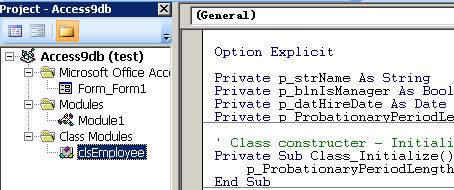
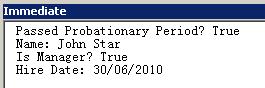
Here is the class module - clsEmployee. VBA code for the class module. Option Explicit Private p_strName As String Private p_blnIsManager As Boolean Private p_datHireDate As Date Private p_ProbationaryPeriodLength As Integer So far, the class has been defined in class module clsEmployee. Next, we coded the button click event subroutine cmdGetClass_Click() on Form1 for button [8. Get Class object]. In this subroutine, we create an object from the class. Then some values were assigned to the class properties and called the PassedProbationaryPeriod method. Finally, we print results in Immediate Window.
Private Sub cmdGetClass_Click()
    Dim blnPassedProbationaryPeriod As Boolean
    Dim objEmp As clsEmployee

    ' Create an employee object from the class.
    Set objEmp = New clsEmployee

    ' Assign values to the object attributes.
    objEmp.Name = "John Star"
    objEmp.IsManager = True
    objEmp.HireDate = #6/30/2010#

    blnPassedProbationaryPeriod = objEmp.PassedProbationaryPeriod(objEmp.HireDate)

    Debug.Print "Passed Probationary Period? " & blnPassedProbationaryPeriod

    Debug.Print "Name: " & objEmp.Name
    Debug.Print "Is Manager? " & objEmp.IsManager
    Debug.Print "Hire Date: " & objEmp.HireDate
End Sub
Immediate Window shows four values. Here comes the end of this article series.
Happy Coding! |
|
Copyright © 2024 GeeksEngine.com. All Rights Reserved. This website is hosted by HostGator. No portion may be reproduced without my written permission. Software and hardware names mentioned on this site are registered trademarks of their respective companies. Should any right be infringed, it is totally unintentional. Drop me an email and I will promptly and gladly rectify it. |
| Home | Feedback | Terms of Use | Privacy Policy |